Projects are collections of your functional specifications and requirements. To define functional specifications, you can use the templates that were created under Requirements Manager settings. You can group these specifications under subjects.
To create projects, follow these steps:
- Go to Application Menu > Data Catalog > Requirements Manager.
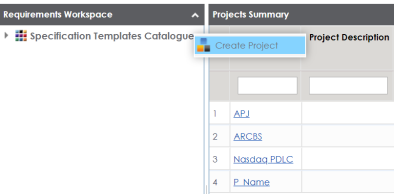
- In the Requirements Workspace pane, right-click the Specification Templates Catalogue node.
- Click Create Project.
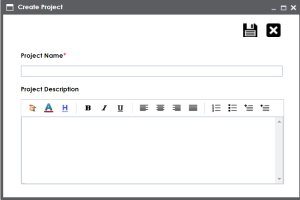
- Enter Project Name and Project Description.
- Project Name: Nasdaq PDLC
- Project Description: This project captures functional and business requirements of the data migration project
- Click
 .
.
The Create Project page appears.
For example:
The project is created and added under Specification Templates Catalogue.
You can also create subjects under projects to group specifications by their functions.
Once a project is created you can:
Right-click or select a project in the Requirements Workspace pane to manage it. Managing projects involves:
- Creating subjects
- Editing or deleting projects
- Viewing project specifications
|
Copyright © 2023 Quest Software Inc. |